Answer
Mar 18, 2026 - 12:00 AM
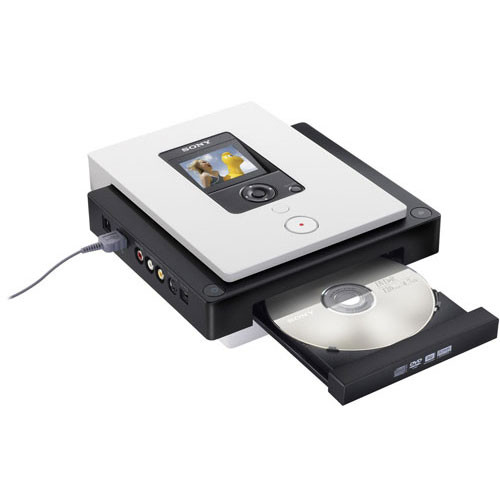
Yes, the Sony VRD-MC3 is a standalone DVD recorder that can convert VHS tapes directly to DVD without requiring a computer. It is known to provide good results for standard VHS transfers, but there are some considerations to keep in mind.
Pros of the Sony VRD-MC3 for VHS to DVD Conversion
✅ Decent Video Quality – Captures 480i resolution, which matches VHS quality.
✅ Multiple DVD Formats – Supports DVD+R, DVD-R, DVD+RW, and DVD-RW for playback on standard DVD players.
✅ Real-Time Recording – Allows direct transfer without extra encoding steps.
✅ S-Video Input – Offers better video quality than composite RCA if your VCR supports it.
Limitations & Considerations
⚠ Compression Artifacts – The VRD-MC3 records in MPEG-2 for DVDs, meaning some quality loss due to compression. Using SP (Standard Play) mode helps maintain better quality.
⚠ Limited Editing Options – No built-in video editing features; what you record is what you get.
Best Practices for High-Quality VHS to DVD Transfers
- Use S-Video instead of composite (RCA) for a sharper image.
- Use a high-quality VCR, preferably one with a built-in TBC (Time Base Corrector).
- Clean your VHS tapes and VCR heads before recording to prevent glitches.
- Record in SP (Standard Play) mode rather than LP or EP to retain better detail.
✅ Standalone & Easy to Use – No PC required; simply connect a VCR via composite (RCA) or S-Video.
⚠ No Built-In TBC (Time Base Corrector) – If your VHS tapes have tracking issues, jitter, or frame skipping, the VRD-MC3 won’t fully correct them. A VCR with a built-in TBC or an external TBC will improve results.
The Sony VRD-MC3 is a solid option for straightforward VHS-to-DVD transfers, especially for users who want a simple, no-PC solution. However, if your tapes are in poor condition or have tracking issues, using a VCR with a TBC will greatly improve the quality of the transfer.